

8W Game Login: Complete Sign-In Guide for Android Users
The 8W Game login process gives registered users access to their existing account without having to create a new profile each time. For most users, signing in only requires the account information used during registration, such as a mobile number, username, or password. However, login problems can happen when credentials are entered incorrectly, the application is outdated, or the internet connection is unstable.
Before signing in, users should make sure they are using the correct application or website and understand how their account information is handled. The latest platform information can be checked through 8WApp before proceeding. This is particularly useful when the application interface or login procedure changes after an update.
This guide explains the sign-in process in a straightforward way, including account access, verification, forgotten passwords, common errors, security practices, and payment-related precautions. The goal is to help existing users understand the process rather than make unsupported claims about the platform or its services.
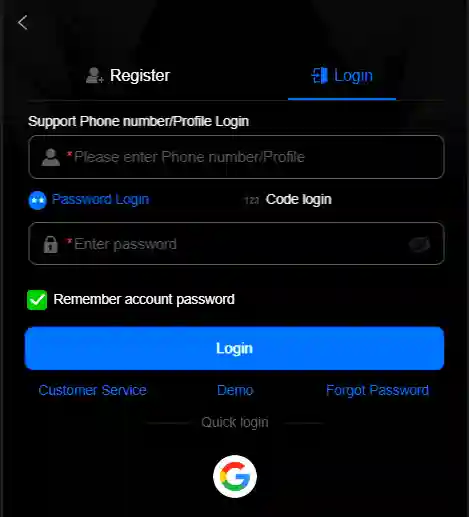
How to Access the 8W Game Login Page
The first step is to open the application or the relevant login page associated with your account. Look for an option labelled Login, Sign In, or a similar button on the opening screen.
If you are using an Android device, make sure the application has been installed from a source you trust. Avoid downloading replacement APK files from random websites simply because they promise an easier login or special account features.
Once the login screen appears, review the fields carefully before entering your information.
A typical sign-in screen may contain:
- Mobile number or username
- Password
- Verification code
- Login button
- Password recovery option
- Registration option for new users
The exact layout can change between application versions, so the labels on your device may not be identical.
Enter Your Registered Account Details
After opening the login screen, enter the same information that you used when creating your account.
If the platform uses a mobile number as the account identifier, enter the registered number in the required format. If it uses a username, check the spelling carefully before submitting it.
Passwords are case-sensitive on many platforms. This means that uppercase and lowercase letters can make a difference.
For example, a password containing:
GameUser2026
may not be treated the same as:
gameuser2026
If your password contains special characters, numbers, or capital letters, enter them exactly as originally created.
Check for Typing Errors
A simple typing mistake is one of the most common reasons for an unsuccessful sign-in.
Before pressing the login button, check:
- Whether Caps Lock is enabled
- Whether the correct mobile number is being used
- Whether there are accidental spaces
- Whether numbers have been entered correctly
- Whether the password is complete
- Whether you are using the correct account
If the application provides a password visibility icon, you can temporarily use it to check what you have typed.
Complete Any Required Verification
Some accounts may require additional verification before access is granted. This could involve a one-time code sent to the registered mobile number or another security step.
If you receive a verification code, enter it only in the legitimate login interface.
Never share an OTP, password, PIN, or verification code with another person. Someone claiming to be customer support does not automatically need access to your private security credentials.
If the verification code does not arrive, wait briefly before requesting another one. Repeatedly requesting codes can sometimes make the process more confusing because several messages may arrive with different codes.
Also check whether your phone has mobile reception and whether incoming SMS messages are working normally.
What to Do After a Successful Login
After your credentials are accepted, you should normally be taken to your account area or home screen.
Take a moment to check whether the displayed account information belongs to you. If something appears unfamiliar, avoid immediately making deposits or other transactions until the issue has been understood.
You may see sections related to your profile, games, account balance, promotions, transactions, or other available functions. The exact options depend on the current version of the platform.
It is a good practice to familiarize yourself with the interface before using any financial feature.
8W Game Login Not Working? Try These Steps
A failed login can have several causes. It is better to troubleshoot them one at a time instead of repeatedly entering different passwords.
Check Your Internet Connection
A weak connection can prevent the application from communicating with its server.
Try opening another website or application to confirm that your internet is working. If other services are also failing, switch between Wi-Fi and mobile data if possible.
Recheck Your Credentials
If the connection is working, carefully check your username, phone number, and password.
Do not assume that a failed login means your account has been deleted. A single incorrect character can be enough to prevent access.
Restart the Application
Close the application completely and open it again.
Temporary application errors can sometimes disappear after restarting. If the problem continues, check whether an updated version is available from a trusted source.
Clear Temporary App Data
Android users can sometimes resolve application problems by clearing temporary cache data.
The general process is:
Settings → Apps → 8W application → Storage → Clear Cache
The exact menu names can differ depending on the Android manufacturer and operating system version.
Be careful when selecting Clear Data, because this may remove locally stored application information and require you to sign in again.
Forgot Your Password?
Forgetting a password is common, especially when an account has not been used for a long period.
If the login page provides a Forgot Password, Reset Password, or similar option, use that official recovery process.
You may be asked to provide the registered mobile number or another account identifier. A verification code may then be sent to the registered contact method.
Create a new password that is difficult for other people to guess. Avoid using information that can easily be associated with you, such as your name, birthday, or phone number.
Do not use the same password for important accounts such as email, banking, or payment services.
Login Problems After Changing Your Phone
Changing smartphones does not necessarily mean that you need a new account. If your account is connected to your registered mobile number or other credentials, you may be able to access it from the new device using the same information.
Before removing the application from your old phone, make sure you know your login details.
If two-factor authentication or SMS verification is enabled, confirm that you still have access to the registered number.
This is one reason why keeping account information up to date is important.
Be Careful With Payment Information
Some users may connect payment services when using online gaming platforms. This makes account security particularly important.
If you use JazzCash for a legitimate payment or financial service, use the official JazzCash website for information about its services.
Never give your JazzCash PIN, OTP, password, or other confidential security information to another person.
A gaming account password and a financial account PIN should never be treated as interchangeable credentials.
Before confirming any payment, check the recipient, amount, and transaction details carefully.
Avoid Fake Login Pages
One of the biggest risks for users of popular applications is a fake login page designed to collect account credentials.
A suspicious page may use a familiar logo or similar wording while being hosted on an unrelated domain.
Before entering your password, check the address carefully. Do not assume a page is legitimate simply because it looks professional.
Be especially cautious about links received through:
- Random social media messages
- Unknown WhatsApp accounts
- Unverified Telegram channels
- Pop-up advertisements
- Unfamiliar APK download pages
- Messages promising free balances or special rewards
If a message creates urgency by saying that your account will immediately expire unless you enter your password, stop and verify the source first.
Do Not Share Your Login Credentials
Your login information should remain private.
Avoid sending your username and password to friends, agents, strangers, or people claiming to provide account assistance.
Even if someone says they need your password to “check” your account, there is no good reason to give another person full access to your profile.
Similarly, verification codes should remain private.
If you suspect that someone else has accessed your account, change the password as soon as possible and review any available account activity.
Using the Account on a Shared Device
Logging in from a shared phone or computer requires additional care.
If you temporarily use another person’s device, avoid saving your password when the browser or application asks whether you want to remember it.
After completing your session, log out completely.
You should also avoid accessing financial services from public computers whenever possible. If you must use one, ensure that you do not leave passwords or payment information saved.
Keep the Application Updated
An outdated application can sometimes cause login or compatibility problems.
If a newer version is available from a trusted source, review the version information before installing it.
Do not install modified APKs merely because they claim to provide automatic login, unlimited balances, free credits, or other unusual features. Such claims should be treated cautiously.
When replacing an APK, make sure you understand what you are installing and whether the source is trustworthy.
Login Security Tips for Android Users
Android users can take several simple steps to protect their accounts.
Use a strong screen lock on your phone and keep Android updated. Install applications only from sources you trust and review permissions before allowing access.
A good password should be unique and difficult to guess. If you have difficulty remembering multiple passwords, consider using a reputable password manager rather than storing passwords in an unsecured note.
Also avoid taking screenshots of passwords, PINs, or verification codes if those screenshots could later be accessed by someone else.
Does Login Guarantee Access to Every Feature?
No application login should be interpreted as a guarantee that every feature will always be available.
Features can change because of application updates, maintenance, regional restrictions, account status, or changes to platform policies.
If a particular function is missing after signing in, check the current application information rather than assuming that the account itself is broken.
Likewise, users should not interpret promotional material as a guarantee of earnings or successful results. Any financial activity connected with gaming carries risk.
A Simple Troubleshooting Checklist
If you cannot access your account, work through this checklist:
- Confirm that your internet connection is working.
- Check that you are using the correct login page or application.
- Re-enter your username or registered number.
- Check your password carefully.
- Request a new verification code if necessary.
- Restart the application.
- Check whether an updated version is available.
- Use the official password recovery option if you forgot your credentials.
- Avoid entering your information on unfamiliar pages.
- Contact the platform’s legitimate support channel if the issue remains unresolved.
This approach is safer than repeatedly trying random credentials or downloading unofficial versions of the application.
Final Thoughts
The 8W Game login process is generally straightforward once an account has been registered and the correct credentials are available. The most important part is not simply getting past the login screen but protecting the account afterward.
Use accurate credentials, keep your password private, protect verification codes, and avoid suspicious login pages. If you experience an access problem, check your connection and account details before taking more complicated steps.
For current information about the platform, users can visit 8WApp. If JazzCash is involved in a transaction, use the official JazzCash service and keep all financial credentials confidential.
Most importantly, treat online gaming as a form of entertainment rather than a guaranteed source of income. Review the applicable rules, understand the financial risks, and only use money you can afford to lose.